


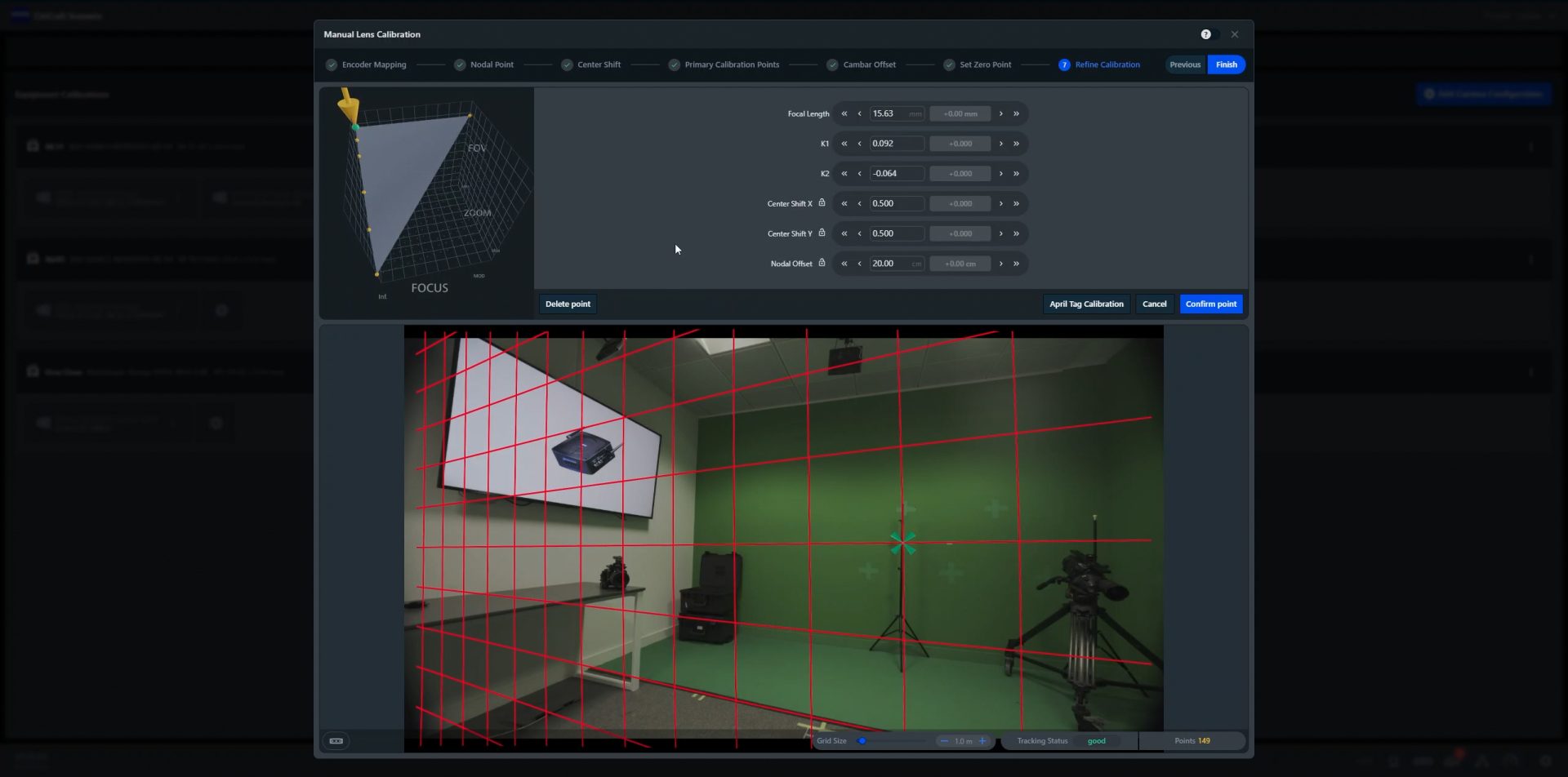
Zeiss has announced a significant update of the Zeiss CinCraft Scenario camera tracking system. With the latest software release 2.1, the powerful and flexible solution now allows users to manually calibrate lenses when no pre-filled template is available. This opens the possibility to work with any spherical lens.
Christophe Casenave, Head of Business Unit Cinematography at Zeiss, said, “With this software update, we are greatly increasing the flexibility in lens choice and compatibility with virtual production stages and broadcast applications.”
The CinCraft Scenario calibration process is guided and designed to be easy to conduct. Users can now initiate a calibration by inserting lens details (for example, engraved barrel marks like focus/iris/zoom) into the CinCraft Scenario Software and performing an initial calibration using a chart.
They can then adjust and fine-tune the calibration until satisfactory results are achieved. The calibration steps for spherical lenses are designed to be straightforward and easy to deploy while still delivering excellent results.
“This update allows CinCraft Scenario users to create a lens template from scratch with ease, enabling tracking with any third-party lenses,” added Casenave.
With the latest software release, users can manually enter measurements for the CamBar to main camera offset instead of relying on the automated ‘Offset Assistant’.
Tom Evans, Product Manager for Zeiss CinCraft, explained, “This offers a faster method to update the offset without needing the chart method, which can sometimes be restrictive on set. Users can quickly input manual measurements without temporarily switching to a wider lens, and can store commonly used offsets, making it easy to apply these values when switching between known camera setups.”
Moreover, CinCraft Scenario 2.1 now automatically detects the clip name on ARRI and Sony cameras and stores this alongside the tracking data, simplifying the process of matching the correct take in Export mode. For cameras that do not provide a clip name automatically, users can manually input it during recording.
The Zeiss CinCraft Scenario system also features an enhanced Export 2.0 update that increases comfort and value in use of tracking data for post production. The new Undistortion ST Maps can be used to undistort camera plates, eliminating the need for shooting lens grids during camera prep.