

Kiloview's new NDI Multiview Player - APB+ News

APB+ News

[the_ad id="929859"]
[the_ad id="929738"]

APB AWARDS - NOMINATE NOW!

[master-leader-web]
[master-leader-mob]

Kiloview’s new NDI Multiview Player

Add Your Heading Text Here

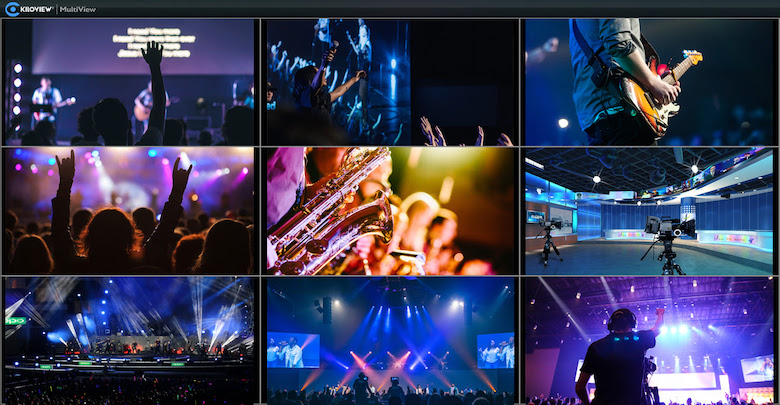
Kiloview has launched the Kiloview Multiview Player (Beta), a premium multi-screen playback application for Network Device Interface (NDI) video streams. The Kiloview Multiview Player will receive and decode nine or more streams with nine split-images displaying from encoders, cameras, and other gear.

It is compatible with various high bandwidth NDI and NDI|HX sources, both 4K and HD, enabling unlimited NDI streams via multi-screen split display, picture-in-picture (PIP), and multi-window playback. It easily connects with smartphones, computers, NDI-enabled encoders, cameras, and production systems, including the TriCaster video production system, as well as the vMix, and OBS live streaming video software.

Jacob Zuo, CTO of Kiloview, noted that there are many Serial Digital Interface (SDI) multi-viewers, but not many NDI-enabled multi-viewers.

“Kiloview’s concept in Kiloview Multiview Player aims, for one, to thoroughly optimise the performance by decreasing the overhead of your computer’s CPU – instead it is mainly on the GPU. For another, it is versatile and flexible enough that you could freely self-customise your layout on a nine split-image screen,” he said.

The Kiloview Multiview Player includes Preview (PVW) and Program (PGM) modes, customisable layouts with 1/2/3/4/5/6/7/8/9 screens, visual expansion with nine split-image (16 image customizable), and tally lighting in conjunction with NDI-enabled encoders.

Zuo added the software can be remotely controlled via mobile devices, and will support more protocol conversions in future.
Categories: APB+ | News & Events
[the_ad id="929856"]

Join The Community

[the_ad id="929828"]
[the_ad id="929838"]
[the_ad id="929840"]

Join The Community

[the_ad id="929842"]

TDM

x Studio

Connect with your clients by working with our in-house brand studio, using our expertise and media reach to help you create and craft your message in video and podcast, native content and whitepapers, webinars and event formats.

Kiloview’s new NDI Multiview Player

Add Your Heading Text Here

Kiloview has launched the Kiloview Multiview Player (Beta), a premium multi-screen playback application for Network Device Interface (NDI) video streams. The Kiloview Multiview Player will receive and decode nine or more streams with nine split-images displaying from encoders, cameras, and other gear.

It is compatible with various high bandwidth NDI and NDI|HX sources, both 4K and HD, enabling unlimited NDI streams via multi-screen split display, picture-in-picture (PIP), and multi-window playback. It easily connects with smartphones, computers, NDI-enabled encoders, cameras, and production systems, including the TriCaster video production system, as well as the vMix, and OBS live streaming video software.

Jacob Zuo, CTO of Kiloview, noted that there are many Serial Digital Interface (SDI) multi-viewers, but not many NDI-enabled multi-viewers.

“Kiloview’s concept in Kiloview Multiview Player aims, for one, to thoroughly optimise the performance by decreasing the overhead of your computer’s CPU – instead it is mainly on the GPU. For another, it is versatile and flexible enough that you could freely self-customise your layout on a nine split-image screen,” he said.

The Kiloview Multiview Player includes Preview (PVW) and Program (PGM) modes, customisable layouts with 1/2/3/4/5/6/7/8/9 screens, visual expansion with nine split-image (16 image customizable), and tally lighting in conjunction with NDI-enabled encoders.

Zuo added the software can be remotely controlled via mobile devices, and will support more protocol conversions in future.
Join The Community

[the_ad id="929855"]
[the_ad id="929837"]
Stay Connected

Facebook

101K

Twitter

3.9K

Instagram

1.7K

LinkedIn

19.9K

YouTube

0.2K

[the_ad id="929822"]
[the_ad id="929841"]

Subscribe to the latest news now!


    Scroll to Top