SmallHD streamlines on-set monitoring and complex multi-camera workflows – APB+ News

APB+ News

APB AWARDS - NOMINATE NOW!

Test Advertisement

SmallHD streamlines on-set monitoring and complex multi-camera workflows

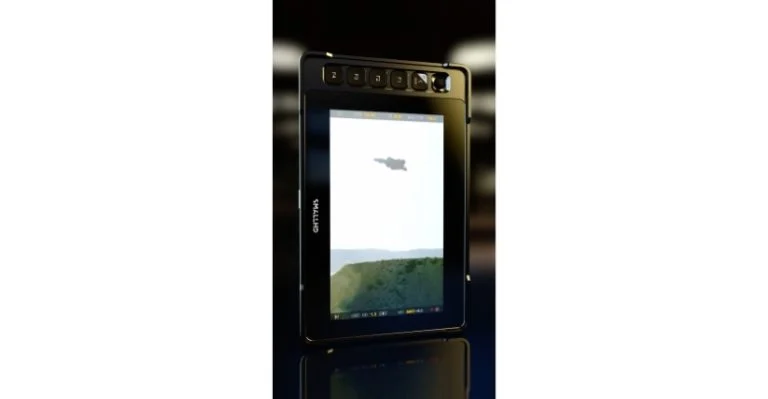
SmallHD has rolled out a major update to its PageOS software, adding a suite of new capabilities aimed at simplifying monitor management and improving on-set efficiency for broadcast and production crews working across increasingly complex workflows. 

The latest release introduces Fleet Control, Portrait Mode, expanded camera control functions and downstream LUT support on 4K/Ultra HD (UHD) production monitors. Together, the updates are designed to reduce setup time, improve visual consistency and help crews manage multi-camera, multi-format environments more effectively as production demands continue to accelerate. 

Matt Eidenbock, Product Manager, SmallHD, said, “Our customers are working faster than ever, often across multiple cameras, monitors, and formats on the same set. This PageOS update is about moving friction, from managing an entire fleet of monitors to supporting vertical content and camera control in one place.

“The crew can now spend less time configuring gear and more time focusing on the shoot.” 

At the centre of the release is Fleet Control, a new desktop application enabled through PageOS 6.3 that allows users to manage multiple monitors simultaneously over a network. The tool enables firmware and settings updates to be deployed across an entire fleet in a single operation, while pages, tools, and look-up tables (LUTs) can be pushed to multiple monitors within seconds. Fleet Control is intended to ensure that setups remain aligned and ready before production begins, whether crews are working with a handful of displays or dozens spread across a large set. 

The update also reflects the rapid rise of vertical and mixed-format production. A new Portrait Mode introduces optimised menu layouts designed for vertical shooting. SmallHD says the feature provides a cleaner and faster monitoring experience for productions that increasingly need to switch between horizontal and vertical formats. 

Camera control is another major focus of the release. Canon camera control has now been integrated into PageOS, allowing users to view shots, adjust settings and navigate camera menus from their SmallHD monitors. The functionality is available for a range of Canon cinema cameras, including the C70, C80, C300 Mark III, C400 and C500 Mark II, and is designed to streamline on-set operations by reducing the need to access camera bodies during shoots.

On selected Quantum and Ultra 10 series monitors, the update also enables camera control through physical dials, giving operators access to key parameters such as ISO, shutter speed or angle, white balance and internal neutral density (ND). 

“At the end of the day, monitoring is about trust,” Eidenbock concluded. “This update is about giving crews the confidence that their monitors are set up correctly, staying consistent across the set, and ready to adapt no matter how the production evolves.”
Join The Community

Display a test ad

Join The Community

APB+

x Studio

Connect with your clients by working with our in-house brand studio, using our expertise and media reach to help you create and craft your message in video and podcast, native content and whitepapers, webinars and event formats.

SmallHD streamlines on-set monitoring and complex multi-camera workflows

Add Your Heading Text Here

SmallHD has rolled out a major update to its PageOS software, adding a suite of new capabilities aimed at simplifying monitor management and improving on-set efficiency for broadcast and production crews working across increasingly complex workflows. 

The latest release introduces Fleet Control, Portrait Mode, expanded camera control functions and downstream LUT support on 4K/Ultra HD (UHD) production monitors. Together, the updates are designed to reduce setup time, improve visual consistency and help crews manage multi-camera, multi-format environments more effectively as production demands continue to accelerate. 

Matt Eidenbock, Product Manager, SmallHD, said, “Our customers are working faster than ever, often across multiple cameras, monitors, and formats on the same set. This PageOS update is about moving friction, from managing an entire fleet of monitors to supporting vertical content and camera control in one place.

“The crew can now spend less time configuring gear and more time focusing on the shoot.” 

At the centre of the release is Fleet Control, a new desktop application enabled through PageOS 6.3 that allows users to manage multiple monitors simultaneously over a network. The tool enables firmware and settings updates to be deployed across an entire fleet in a single operation, while pages, tools, and look-up tables (LUTs) can be pushed to multiple monitors within seconds. Fleet Control is intended to ensure that setups remain aligned and ready before production begins, whether crews are working with a handful of displays or dozens spread across a large set. 

The update also reflects the rapid rise of vertical and mixed-format production. A new Portrait Mode introduces optimised menu layouts designed for vertical shooting. SmallHD says the feature provides a cleaner and faster monitoring experience for productions that increasingly need to switch between horizontal and vertical formats. 

Camera control is another major focus of the release. Canon camera control has now been integrated into PageOS, allowing users to view shots, adjust settings and navigate camera menus from their SmallHD monitors. The functionality is available for a range of Canon cinema cameras, including the C70, C80, C300 Mark III, C400 and C500 Mark II, and is designed to streamline on-set operations by reducing the need to access camera bodies during shoots.

On selected Quantum and Ultra 10 series monitors, the update also enables camera control through physical dials, giving operators access to key parameters such as ISO, shutter speed or angle, white balance and internal neutral density (ND). 

“At the end of the day, monitoring is about trust,” Eidenbock concluded. “This update is about giving crews the confidence that their monitors are set up correctly, staying consistent across the set, and ready to adapt no matter how the production evolves.”
Join The Community

Stay Connected

Facebook

101K

Twitter

3.9K

Instagram

1.7K

LinkedIn

19.9K

YouTube

0.2K

APB+

x Studio

Connect with your clients by working with our in-house brand studio, using our expertise and media reach to help you create and craft your message in video and podcast, native content and whitepapers, webinars and event formats.

Subscribe to the latest news now!


    Scroll to Top